Entradas

SPOT DE AUDACITY

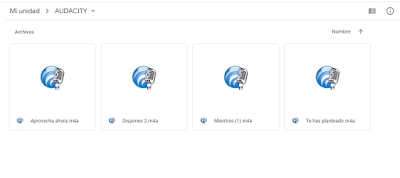
Este es nuestro anuncio de radio. Promocionamos un pack "PremiumPlus" en una plataforma de música, llamada "AllRecords". Ofrecemos toda la música que existe, sin ninguna interrupción por los anuncios, la posibilidad de reproducción en bucle y sin orden en las listas propias o públicas. Nos pareció un buen tema, ya que la mayoría de nosotros escuchamos cualquier tipo de música durante todo el día. Con estos controles, podremos dedicar más tiempo a la música más cómodamente. Hemos utilizado 10 pistas diferentes. 9 de ellas son nuestras voces, y la música de fondo es la décima. El título original es " Birds ", de Coldplay , pero la hemos usado en su versión instrumental. Utilizamos el efecto de la reducción de sonido, para el ruido de fondo, el efecto de cambio de tono, o la herramienta de envolvente. "ALLRECORDS" SPOT 
RESUMEN BLOQUE 3

Imagen

ENCUESTA DE ARDUINO

Imagen

DRAWDIO

Imagen
#include < EducationShield . h > #include "pitches.h" CapacitiveSwitch me = CapacitiveSwitch ( 2 , 3 ) ; Melody speaker = Melody ( 8 ) ; int lowerThreshold = 200 ; int upperThreshold = 1100 ; int toneLow = NOTE_C3 ; int toneHigh = NOTE_B6 ; void setup ( ) { } void loop ( ) {     int value = me . getValue ( lowerThreshold ) ;     int pitch ;   if ( value > 0 ) {     pitch = map ( value , lowerThreshold , upperThreshold , toneLow , toneHigh ) ;   } else {     pitch = 0 ;   }     speaker . playTone ( pitch , 10 ) ; }

P.O.V.

Imagen
int ledPins [ ] = { 2 , 3 , 4 , 5 , 7 } ; int pinCount = 5 ; VUMeter vuMeter ; int rowCount = 0 ; int rowLength = 22 ; int delayTime = 9 ; // The message where 0 is LOW and 1 is HIGH boolean message [ 5 ] [ 22 ] = {   // H H H H   O O O O   L L L L   A A A A   { 0 , 1 , 0 , 0 , 1 , 0 , 0 , 1 , 1 , 0 , 0 , 1 , 0 , 0 , 0 , 0 , 0 , 1 , 1 , 0 , 0 , 0 } ,   { 0 , 1 , 0 , 0 , 1 , 0 , 1 , 0 , 0 , 1 , 0 , 1 , 0 , 0 , 0 , 0 , 1 , 0 , 0 , 1 , 0 , 0 } ,   { 0 , 1 , 1 , 1 , 1 , 0 , 1 , 0 , 0 , 1 , 0 , 1 , 0 , 0 , 0 , 0 , 1 , 1 , 1 , 1 , 0 , 0 } ,   { 0 , 1 , 0 , 0 , 1 , 0 , 1 , 0 , 0 , 1 , 0 , 1 , 0 , 0 , 0 , 0 , 1 , 0 , 0 , 1 , 0 , 0 } ,   { 0 , 1 , 0 , 0 , 1 , 0 , 0 , 1 , 1 , 0 , 0 , 1 , 1 , 1 , 1 , 0 , 1 , 0 , 0 , 1 , 0 , 0 } } ; void setup ( ) {   vuMeter . config ( pinCount , ledPins ) ;   vuMeter . begin ( ) ; } void loop ( ) {   if ( rowCount ...

PRUEBAS CON MOTOR DC

int motor = 9 ; void setup ( ) {   pinMode ( motor , OUTPUT ) ; // put your setup code here, to run once: } void loop ( ) { digitalWrite ( motor , HIGH ) ; delay ( 1000 ) ; digitalWrite ( motor , LOW ) ; delay ( 1000 ) ; // put your main code here, to run repeatedly: }

ENTRADAS ANALÓGICAS 5

Imagen

AUDACITY (AUDIOS)

Imagen

SIGUE EXPERIMENTANDO 2

int buzzer = 9 ; int val = 0 ; void setup ( ) { pinMode ( buzzer , OUTPUT ) ; } void loop ( ) { int val = analogRead ( A0 ) ; tone ( buzzer , val , 500 ) ; delay ( 2000 ) ; }

BLOQUE 3 SEÑALES ANALÓGICAS 4

Imagen

BLOQUE 3 SEÑALES ANALÓGICAS 3

Imagen

BLOQUE 3 SEÑALES ANALÓGICAS 2

Imagen

SIGUE EXPERIMENTANDO 1

int LED = 9 ; void setup ( ) { pinMode ( LED , OUTPUT ) ; } void loop ( ) { int val = analogRead ( A0 ) ; if ( val > 255 ) {   digitalWrite ( LED , HIGH ) ; } else {   digitalWrite ( LED , LOW ) ; } }

GRABACIÓN DE AUDICITY

Imagen
Canción=>  Vista previa del archivo adjunto Placebo - Running Up That Hill.mp3 Placebo - Running Up That Hill.mp3 11 MB

ENCUESTA DE SELFIE

Imagen

AUDACITY 1

Imagen
Guardamos en MP3 la canción elegida: Running up that hill- Placebo (2003) Guardamos en el formato de Audacity Running up that hill- Placebo (2003)

BLOQUE 3, SEÑALES ANALÓGICAS 1

Imagen
   

RESUMEN BLOQUE 2

Imagen

TEST FINAL BLOQUE 2

Imagen

PROYECTO SIMONSAYS

Imagen
#include < EducationShield . h > int ledPins [ ] = { 2 , 3 , 4 , 5 , 6 } ; int pinCount = 5 ; VUMeter vuMeter ; Knob pot = Knob ( A0 ) ; Button button = Button ( 9 ) ; Melody piezo = Melody ( 8 ) ; int turns_begin = 2 ; int turns_max = 10 ; int game [ 10 ] ; int turns = 2 ; int blinkTime = 500 ; void setup ( ) {   vuMeter . config ( pinCount , ledPins ) ;   vuMeter . begin ( ) ;   pot . setLevels ( 5 ) ;   button . begin ( ) ;     randomSeed ( analogRead ( A5 ) ) ; } void loop ( ) {   newGame ( ) ;   simonSays ( ) ;   delay ( 1000 ) ;   getInputs ( ) ; } void newGame ( ) {   vuMeter . blinkAll ( 200 , 3 ) ;   vuMeter . clear ( ) ;   delay ( 500 ) ;   for ( int i = 0 ; i < turns ; i ++ ) {     game [ i ] = random ( pinCount ) ;   } } void simonSays ( ) {   for ( int i ...

ENTRADAS DIGITALES 3, 4 Y 5

Imagen
Por último, cambiamos el código para que podamos encender 1 LED o 3 LEDS a la vez con el botón, o que suene una melodía en el piezo. CÓDIGO DEL ÚNICO LED: int inputPin = 6 ; int ledPin = 13 ; void setup ( ) { pinMode ( inputPin , INPUT ) ; pinMode ( ledPin , OUTPUT ) ; } void loop ( ) { if ( digitalRead ( inputPin ) == HIGH ) { digitalWrite ( ledPin , HIGH ) ; } else {   digitalWrite ( ledPin , LOW ) ;   } } CÓDIGO DE LOS 3 LEDS: #include < EducationShield . h > VUMeter me ; int inputPin = 6 ; int pins [ ] = { 2 , 3 , 4 } ; int pinCount = 3 ; void setup ( ) {   me . config ( pinCount , pins ) ;   me . begin ( ) ; pinMode ( inputPin , INPUT ) ; pinMode ( pinCount , OUTPUT ) ; } void loop ( ) { if ( digitalRead ( inputPin ) == HIGH ) { me . on ( 0 ) ; me . on ( 1 ) ; me . on ( 2 ) ; } else { me . off ( 0 ) ; me . off ( 1 ) ; me . off ( 2 ) ;   } } ...

ENTRADAS DIGITALES 2

Imagen
En la siguiente actividad, conseguimos activar un LED de la placa con el botón int inputPin = 6 ; int ledPin = 13 ; void setup ( ) {   pinMode ( inputPin , INPUT ) ;   pinMode ( ledPin , OUTPUT ) ; } void loop ( ) {   if ( digitalRead ( inputPin ) == HIGH ) {     digitalWrite ( ledPin , HIGH ) ;   }   else {     digitalWrite ( ledPin , LOW ) ;   } }

ENTRADAS DIGITALES 1

Imagen
En esta práctica encendemos y apagamos un LED conectando y desconectando un cable. int inputPin = 5 ; int ledPin = 13 ; void setup ( ) {   pinMode ( inputPin , INPUT ) ;   pinMode ( ledPin , OUTPUT ) ; } void loop ( ) {   if ( digitalRead ( inputPin ) == HIGH ) {     digitalWrite ( ledPin , HIGH ) ;   }   else {     digitalWrite ( ledPin , LOW ) ;   } }

MELODÍA DE BEEP

Imagen
void setup ( ) { tone ( 8 , 392 , 500 ) ; delay ( 300 ) ; tone ( 8 , 440 , 500 ) ; delay ( 300 ) ; tone ( 8 , 493.88 , 700 ) ; delay ( 300 ) ; tone ( 8 , 493.88 , 500 ) ; delay ( 300 ) ; tone ( 8 , 440 , 500 ) ; delay ( 300 ) ; tone ( 8 , 392 , 700 ) ; delay ( 300 ) ; tone ( 8 , 493.88 , 500 ) ; delay ( 300 ) ; tone ( 8 , 440 , 700 ) ; delay ( 300 ) ; tone ( 8 , 440 , 700 ) ; delay ( 300 ) ; tone ( 8 , 493.88 , 500 ) ; delay ( 300 ) ; tone ( 8 , 440 , 600 ) ; delay ( 400 ) ; tone ( 8 , 392 , 500 ) ; delay ( 300 ) ; tone ( 8 , 440 , 500 ) ; delay ( 300 ) ; tone ( 8 , 493.88 , 700 ) ; delay ( 300 ) ; tone ( 8 , 493.88 , 500 ) ; delay ( 300 ) ; tone ( 8 , 440 , 500 ) ; delay ( 300 ) ; tone ( 8 , 392 , 600 ) ; delay ( 300 ) ; tone ( 8 , 440 , 500 ) ; delay ( 300 ) ; tone ( 8 , 392 , 1000 ) ; delay ( 1000 ) ;   }   void loop ( ) {   ...

PLACA DE ARDUINO VUMETER

Imagen
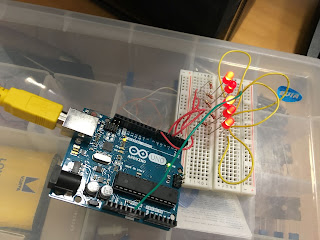
VUMeter me ; int pins [ ] = { 2 , 3 , 4 , 5 , 7 } ; int pinCount = 5 ; void setup ( ) {   me . config ( pinCount , pins ) ;   me . begin ( ) ; void loop ( ) { me . on ( 0 ) ; delay ( 1000 ) ; me . on ( 1 ) ; delay ( 1000 ) ;   me . on ( 2 ) ;   delay ( 1000 ) ;   me . on ( 3 ) ;   delay ( 1000 ) ;   me . on ( 4 ) ;   me . blinkAll ( 100 , 10 ) ;   delay ( 1000 ) ;   me . on ( 0 ) ;   delay ( 800 ) ;   me . blink ( 0 , 200 , 3 ) ;   delay ( 1000 ) ;   me . scrollRight ( 700 , 1 ) ;   delay ( 1000 ) ;   me . on ( 4 ) ;   delay ( 800 ) ;   me . blink ( 4 , 200 , 3 ) ;   delay ( 1000 ) ;   me . scrollLeft ( 700 , 1 ) ;   delay ( 800 ) ;   me . blink ( 1 , 800 , 1 ) ;   delay ( 200 ) ;   me . blink ( 3 , 800 , 1 ) ;   delay ( 200 ) ;   me . blink ( 2 , 800 , 1 )...